
In the constantly changing world of digital marketing, tools like Google Search Console have become essential for staying ahead of the curve. If you’ve ever wondered why your website isn’t getting enough traffic or why some pages rank while others don’t, this tool has the answers.
Whether you’re running a personal blog, managing an e-commerce store, or working with clients as part of the Best SEO Service in UAE, understanding how to use Google Search Console can completely change your SEO results. It’s not just a tool — it’s your direct connection to how Google sees your website.
Let’s break everything down step by step in a simple, practical way.
What is Google Search Console?
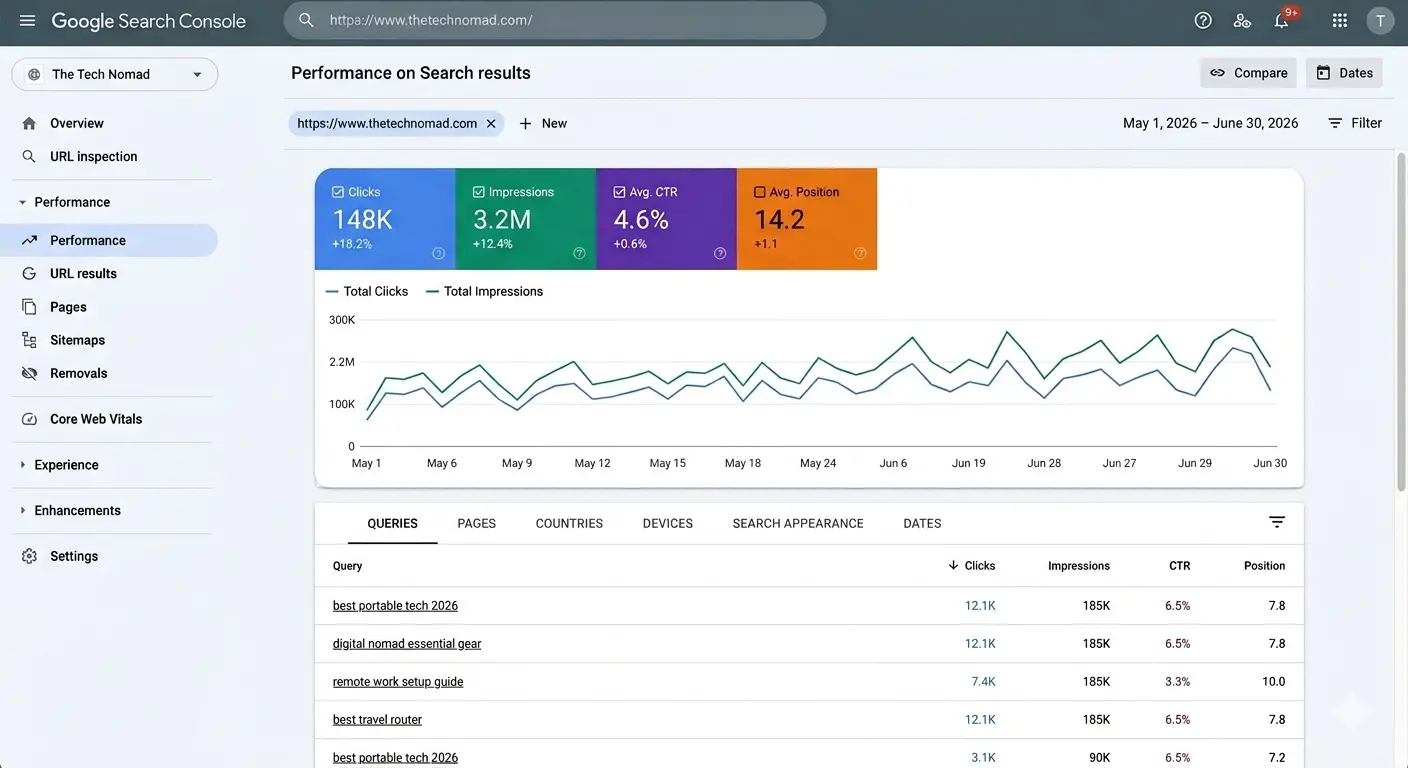
Google Search Console (GSC) is a complimentary tool from Google that enables website owners to track, manage, and optimize how their site appears in Google Search. It provides essential insights to identify issues, improve performance, and ensure your content is properly discovered and indexed. Unlike Google Analytics, which tracks user behavior on your website, GSC focuses on how Google perceives your site, giving you insights into indexing, ranking, and search performance.
With GSC, you can:
- Check which pages are indexed by Google.
- Identify and fix indexing issues.
- Monitor search performance and rankings.
- Discover top-performing keywords.
- Optimize content based on real search data.
Why Google Search Console is a Game-Changer in 2026
SEO is no longer about just stuffing keywords into content. It’s about understanding user intent, technical site health, and search performance. This is where GSC for SEO becomes invaluable. Here are some reasons why it matters:
Accurate Keyword Data
With GSC keyword data, you can see which queries are driving traffic to your site, allowing you to optimize content for high-performing and low-competition keywords.
Performance Monitoring
Use GSC to monitor website traffic with Google Search Console and track how your pages perform over time.
Fixing Indexing Issues
Fix indexing issues with Google Search Console to ensure that all your important pages appear in search results.
Improving Rankings
By analyzing data from Search Console ranking analysis, you can make informed decisions to improve website rankings using GSC.
Insights for Strategy
Search Console insights combine performance metrics with content analysis to help you create more effective SEO strategies.
Step-by-Step Google Search Console Setup
If you are new to Google Search Console, here’s a simple guide to get started:
Step 1: Verify Your Website
Go to Google Search Console (GSC) and sign in with your Google account.
Click “Add Property” and choose between Domain or URL prefix.
Verify ownership using recommended methods such as DNS record, HTML file upload, or Google Analytics verification.
Step 2: Submit Your Sitemap
Submitting a sitemap allows Google to crawl your site efficiently:
In GSC, go to “Sitemaps.”
Enter the URL of your sitemap (usually
yourdomain.com/sitemap.xml).Click “Submit.”
Step 3: Explore Performance Reports
Navigate to the Performance tab to see:
Total clicks and impressions
Average CTR (Click-Through Rate)
Average position in search results
This section provides a clear overview of your site’s Search Console ranking analysis.
Step 4: Check Coverage Reports
The Coverage tab shows which pages are indexed and alerts you to errors such as:
Pages blocked by robots.txt
Server errors
Soft 404s
Fixing these issues is crucial for optimizing your site using Google Search Console tools.
How to Read Search Console Performance Reports
Understanding the performance data is key to making actionable SEO decisions. Here’s how to interpret the reports:
Total Clicks: Number of times users clicked your site in search results.
Total Impressions: How often your pages appeared in searches.
Average CTR: Percentage of impressions that led to clicks.
Average Position: Your site’s average rank for each query.
By analyzing these metrics, you can track keywords and rankings using GSC and identify opportunities to improve your SEO strategy.
Fix Indexing Issues with Google Search Console
Indexing issues can prevent your pages from appearing in Google Search. Here’s how to address them:
1. Check Coverage Report
Look for errors or warnings in the Coverage tab.
2. Submit URLs for Indexing
Use the URL Inspection tool to request indexing of important pages.
3. Resolve Crawl Errors
Fix 404 errors, redirect broken links, and ensure that your site is mobile-friendly.
4.Enhance Page Quality
Google favors pages with valuable content and proper HTML structure. Use GSC to identify pages with low impressions or clicks and improve them.
By regularly monitoring these issues, you can improve website rankings using GSC more effectively.
Advanced GSC Techniques for SEO Success
Once you’re comfortable with the basics, it’s time to leverage advanced strategies:
1. Analyze Top Queries
Use GSC keyword data to identify high-performing keywords and optimize content around them. Focus on queries that bring impressions but have low CTR — improving titles and meta descriptions can boost clicks.
2. Discover Content Gaps
Compare your top pages with competitors to find opportunities. Search Console insights can show which topics your audience is searching for but are missing on your site.
3. Monitor Backlinks
GSC provides information on which websites link to you. Quality backlinks improve domain authority and rankings.
4. Track Mobile Usability
Mobile-friendliness is critical. Use the Mobile Usability report to fix issues like touch elements being too close or content not fitting the screen.
5. Optimize Core Web Vitals
Use GSC to monitor page speed, layout shifts, and interactivity metrics to ensure Google views your site as high-quality.
Google Search Console Tips for Beginners 2026
If you’re just starting with GSC, these tips will help:
Regularly check the Performance tab to monitor trends.
Use Step-by-step Google Search Console guides from Google’s help center.
Focus on fixing critical errors in the Coverage report.
Use GSC tips and tricks like filtering queries by country or device.
Combine GSC data with Google Analytics to get a complete picture of traffic.
How to Use Google Search Console 2026 for SEO
Here’s a practical workflow for integrating GSC into your SEO efforts:
1. Monthly Performance Audit
Export data from the Performance report to see top queries and pages. Optimize underperforming content.
2. Weekly Index Check
Monitor the Coverage tab for errors or newly blocked pages.
3. Content Planning
Use Search Console insights to identify trending topics and plan new blog posts.
4. Technical SEO Fixes
Address crawl errors, mobile usability issues, and speed optimizations regularly.
5. Track Keyword Movements
Keep an eye on Search Console ranking analysis to see which keywords are gaining or losing visibility.
Monitor Website Traffic with Google Search Console
Traffic monitoring in GSC allows you to understand audience behavior:
By Device: See if your desktop or mobile traffic is stronger.
By Country: Identify which regions contribute most to traffic.
By Page: Discover which pages bring the most clicks.
By Query: Track keywords driving visitors.
By combining these insights, you can optimize your site using Google Search Console tools to enhance the user experience and boost rankings.
Common GSC Mistakes to Avoid
Even experienced marketers make mistakes. Avoid these pitfalls:
Ignoring Crawl Errors – They can prevent pages from appearing in search.
Overlooking Mobile Usability – Mobile-first indexing is standard.
Misreading Performance Data – Understand impressions, clicks, and CTR correctly.
Not Using Filters – Filters in Performance reports help focus on high-impact data.
Neglecting New Features – Always explore Google Search Console 2026 updates for improvements.
How to Track Keywords and Rankings Using GSC
Tracking keyword performance in GSC is simple:
Go to the Performance tab.
Click “Queries” to view the keywords your site ranks for.
Use filters to track position changes over time.
Combine with Step-by-step Google Search Console tutorials to interpret trends.
This process helps you improve website rankings using GSC effectively.
Optimize Your Site Using Google Search Console Tools
Here’s a checklist for ongoing optimization:
Submit Sitemaps: Ensure all pages are crawled.
Fix Indexing Issues: Use the Coverage report regularly.
Monitor Core Web Vitals: Speed and usability matter.
Check Search Queries: Adjust content based on high-potential keywords.
Use Enhancements Reports: Implement structured data, AMP, and rich results.
By using these advanced GSC techniques for SEO success, your site can achieve higher rankings and better visibility.
Conclusion
Mastering Google Search Console is no longer optional — it’s essential for anyone serious about SEO in 2026. From understanding GSC keyword data to addressing technical issues, this tool gives website owners the insights needed to improve rankings, increase traffic, and enhance user experience. By following this complete SEO blueprint, including Step-by-step Google Search Console instructions, advanced strategies, and beginner-friendly tips, you can make the most of GSC to achieve long-term SEO success.